Special Filters
All reports basically use the dimensions to filter data. There are two special filters available to be used in addition.
Focus
There are two "Focus" checkboxes for easy differentiation of service level relevant objects:
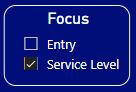
CallTypes either belong to the "Entry" or the "Service Level" checkbox.
Entry: Selects CallTypes that are assigned to enter/stay in the system, before resources are allocated or where no routing will happen (e.g. out of hours).
Service Level: Selects CallTypes that are service level relevant
If you are not focusing on IVR menus or out of hours activities, you will normally exclude entry-objects within your reporting data.
Short Call Threshold (s)
This filter allows you to enter the boundary in seconds, from where a call will be included and counted as an abandoned call:
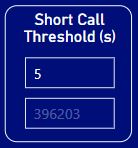
The upper field determines the lower limit for the threshold value in seconds. The default value is set to 5 seconds as in CUIC reports and will therefore ignore all abandoned calls before 5 seconds. If you set the value to 0 seconds, all abandoned calls are included.
The lower field shows the longest waiting time of an abandoned call and cannot be changed.